Difference between revisions of "Creality 3D Printers"
| Line 33: | Line 33: | ||
=Creality Printers at MakerFX= | =Creality Printers at MakerFX= | ||
| − | Use Simplify3D on the 3D Printing PC to slice your object and manually copy to SD card. | + | The Creality printers DO NOT have Octoprint (yet). Use Simplify3D on the 3D Printing PC to slice your object and manually copy to SD card. |
{| class="wikitable" | {| class="wikitable" | ||
Revision as of 21:52, 28 July 2018
edit
NOTICE!
No ABS! Recommend PLA. Contact 3D Printing Point-of-Contact for assistance with PETG
Pre-Flight Instructions
Once these steps are completed, they do not need to be completed before each and every print in a given session. They only take a few minutes to complete and it will ensure you have a good experience with the printer.
| Step | Text Instructions | Video Instructions |
| 1 | TODO: Setting nozzle height | Setting nozzle height |
| 2 | TODO: Instructions if you need to unload filament | Need volunteer! |
| 3 | TODO: Loading filament | Setting nozzle height (9:17 to 9:54) |
Creality Printers at MakerFX
The Creality printers DO NOT have Octoprint (yet). Use Simplify3D on the 3D Printing PC to slice your object and manually copy to SD card.
CR-10 Mini |
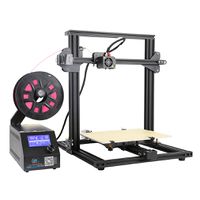
|
| 300mm x 220mm x 300mm |
| Heated Bed = Yes |
| Nozzle = 0.40 |
Consumables
- Hairspray
- Tape
- Purple Disappearing Glue Stick
