Difference between revisions of "Laser Zone"
(Created page with "{{MFXReserveToolTime}} {| class="wikitable" |- | style="vertical-align:top; text-align:left; background-color: #E5E7E9;" | ''' === Epilog 50 Watt === ''...") |
(update rabbit work area) |
||
| (15 intermediate revisions by 3 users not shown) | |||
| Line 1: | Line 1: | ||
{{MFXReserveToolTime}} | {{MFXReserveToolTime}} | ||
| + | =CO2 Lasers= | ||
{| class="wikitable" | {| class="wikitable" | ||
|- | |- | ||
| style="vertical-align:top; text-align:left; background-color: #E5E7E9;" | | | style="vertical-align:top; text-align:left; background-color: #E5E7E9;" | | ||
''' | ''' | ||
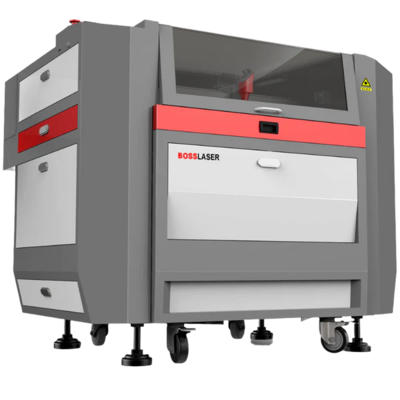
| − | === [[ | + | === [[ Laser_Boss_LS-1630 | Boss Laser LS-1630 ]] === |
''' | ''' | ||
| style="vertical-align:top; text-align:left; background-color: #E5E7E9;" | | | style="vertical-align:top; text-align:left; background-color: #E5E7E9;" | | ||
''' | ''' | ||
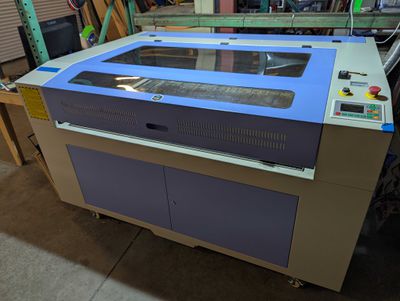
| − | === [[ Laser_Audrey | Audrey | + | === [[ Laser_Audrey | Audrey]] === |
| + | ''' | ||
| + | |||
| + | | style="vertical-align:top; text-align:left; background-color: #E5E7E9;" | | ||
| + | ''' | ||
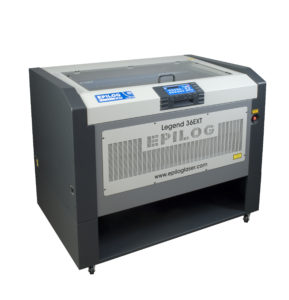
| + | === [[ Laser_Epilog | Epilog Legend 36EXT (IN STORAGE)]] === | ||
''' | ''' | ||
|- | |- | ||
| style="height:300px; background-color: white;" | | | style="height:300px; background-color: white;" | | ||
| − | [[File: | + | [[File:Boss-ls-1630.png|400px|center|link=Laser_Boss_LS-1630]] |
| style="height:300px; background-color: white;" | | | style="height:300px; background-color: white;" | | ||
| − | [[File: | + | [[File:Audrey_032025.jpg|400px|center|link=Laser_Audrey]] |
| + | |||
| + | | style="height:300px; background-color: white;" | | ||
| + | [[File:Legend36ext-product-289x300.jpg|400px|center|link=Laser_Epilog]] | ||
|- | |- | ||
| style="vertical-align:top; text-align:left; background-color: white;" | | | style="vertical-align:top; text-align:left; background-color: white;" | | ||
| + | * 105 watt CO2 laser | ||
| + | * 30" wide X 16" deep | ||
| + | * Rotary tool available | ||
| + | * Software: [[LightBurn]] | ||
| + | |||
| + | | style="vertical-align:top; text-align:left; background-color: white;" | | ||
| + | * 100 watt CO2 laser | ||
| + | * 48" wide X 36" deep | ||
| + | * No rotary tool | ||
| + | * Software: [[LightBurn]] | ||
| style="vertical-align:top; text-align:left; background-color: white;" | | | style="vertical-align:top; text-align:left; background-color: white;" | | ||
| − | * | + | * 50 watt CO2 laser |
| + | * 36" wide X 24" deep | ||
| + | * Rotary tool available | ||
| + | * Software: Illustrator | ||
|} | |} | ||
| + | |||
| + | |||
| + | =Fiber Lasers= | ||
| + | {| class="wikitable" | ||
| + | |- | ||
| + | | style="vertical-align:top; text-align:left; background-color: #E5E7E9;" | | ||
| + | ''' | ||
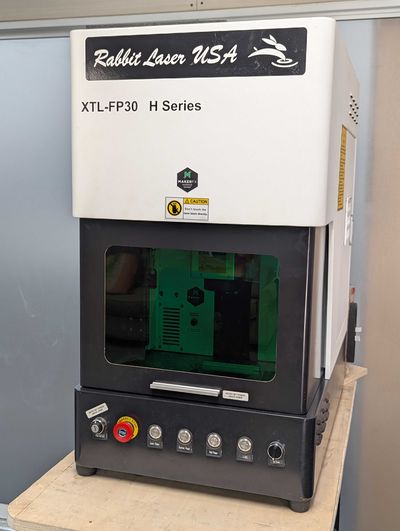
| + | === [[ Rabbit_Fiber_Laser_XTL-FP30 | Rabbit Fiber Laser XTL-FP30 ]] === | ||
| + | ''' | ||
| + | |||
| + | |- | ||
| + | | style="height:300px; background-color: white;" | | ||
| + | [[File:Rabbit_032025.jpg|400px|center|link=Rabbit_Fiber_Laser_XTL-FP30]] | ||
| + | |||
| + | |- | ||
| + | | style="vertical-align:top; text-align:left; background-color: white;" | | ||
| + | * 30 watt Fiber laser | ||
| + | * Work area: 4.3" x 4.3" | ||
| + | * Rotary tool available | ||
| + | * Software: [[LightBurn]] | ||
| + | |||
| + | |||
| + | |} | ||
| + | |||
| + | =LightBurn Software= | ||
| + | |||
| + | Most of our users use [[LightBurn]] for design and laser control. Visit the [[LightBurn]] page to get started! | ||
| + | |||
Latest revision as of 08:11, 26 April 2025
edit
REMEMBER To Reserve Time!
Various tools such as the lasers, 3D Printers, and Forest CNC need to be reserved before using the tool. There is a link on each tool's wiki page, and in each tool's Slack channel to reserve time, or you can select the tool from the MakerFX PickTime page
Note: As of March 2025, we are implementing PickTime tool by tool - review the Slack channel for each tool for current status.
CO2 Lasers
|
Boss Laser LS-1630
|
Audrey
|
Epilog Legend 36EXT (IN STORAGE)
|
 |
 |
 |
|
|
|
Fiber Lasers
|
Rabbit Fiber Laser XTL-FP30
|
 |
|
LightBurn Software
Most of our users use LightBurn for design and laser control. Visit the LightBurn page to get started!
